


Tournamental: Post Mortem
I was tasked with designing and implementing a game mechanic for a tile-based game, called Tournamental. A tile-based game means that the player will move one tile at a time, and any actions that occur on that tile, have their information and coding stored within the tile, and not the player character. Then, after I finished my mechanic, I was tasked with implementing a mechanic that one of my peers had designed, into the overall project, and make it work seamlessly with my original mechanic.
What Went Right?
Hammer Time
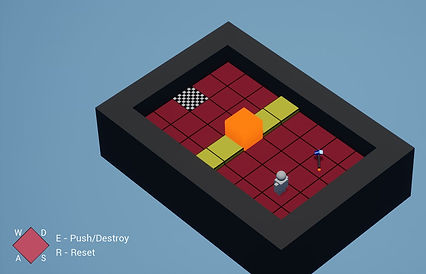
I knew I wanted a mechanic in which the player would find a hammer on one tile, pick it up, and use it to break a block on another tile. To make this happen, I used the basic shapes within the game to design a hammer that could be placed floating above a tile. Then I needed to let the player pick it up. To simulate this, I simply coded the blueprint so that when the player enters the hammer tile, the hammer itself gets destroyed. A variable that is attached to the player, HasHammer, is set as true, and the hammer then can be used elsewhere.

Breakable Block
I wanted a block that could be destroyed once the player has acquired the hammer, or when the HasHammer variable is true. However, I didn’t want the block to simply be destroyed after one hit. So, I created a variable for the number of hits the block has taken, then after each time the player “hit” the block, I increased the number of this variable by one. I then set parameters for when the number changed, so that it looked as though the hammer was damaging the block.
Pass Through
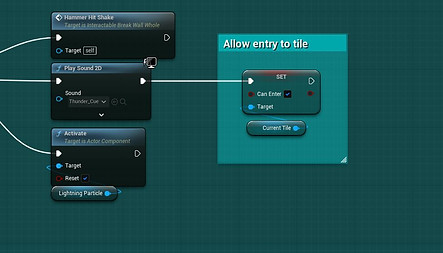
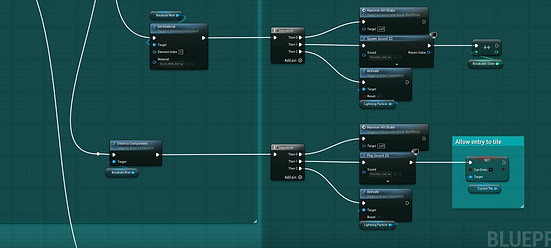
Once the block was destroyed, I had to tell the system to allow the player to enter the tile that the block was sitting on before it was destroyed. However, at first, I had this all backwards, and the player could easily just walk through the block. This meant I had to do a little research into the existing code for the functionality of the game. I eventually figured out that I simply had to set the “CanEnter” boolean variable to true, once the block is destroyed on the final hit.
It Goes Both Ways
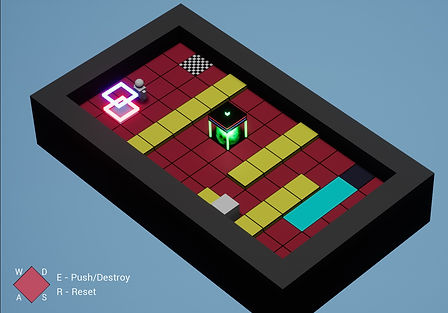
When it came time to implement a mechanic from one of my peers, I chose to implement a teleporter mechanic. The teleporter was originally designed as a one-way system. However, in order for me to integrate it with my Breakable Block mechanic, I needed it to be a two-way system. I simply gave the teleport tile a “CanSend” variable, and set the sending tile to true, and the receiving tile to false. Then I just swapped the state of the variable when the player exits the tile. Viola! A two-way teleporter.
Power Up
I felt as though something was missing from the whole system, but I couldn’t figure it out. Then it finally hit me; the teleporters should only work dependent on a power source. So, I created a Power Cell tile that could be turned on, and used an event dispatcher to send a signal to the teleporter tile to enable them when the power cell is activated, and unpowered them when it is deactivated.

What Went Wrong?
Multiple Interactions
For the breakable block, I wanted it to be hit 3 times, and be destroyed on the third. However, I couldn’t seem to get it figured out for a long time. Then finally I got it figured out. I tried several different methods, but nothing worked. I eventually gave into my pride, and asked for help. That’s when I learned that it is sometimes the simplest of solutions that seem the hardest at first.

Walls
The project came with a wall tile. However, it seemed to block part of the level from view in areas that were too close to the wall. So, my first instinct was to take the wall way. By that I mean that I actually set the tile type to “none” thinking that would do the trick. Then a little later, I realized that I wanted to change those tiles to a different tile type, but they were gone. As in, I essentially deleted them! I had to completely remake the whole level to get it set up the way I wanted it. After that, I designed an “Edge” tile that is still a wall, but it is a lot shorter so the level can be seen.


Chaos System
I attempted to use the new chaos particle system included in Unreal Engine 5, but I couldn’t get it figured out, so I ended up scrapping the whole idea. Which in turn, caused me to cut corners on some audio assets that I had intended to use. Although it didn’t work out, it taught me to always have a backup plan.
Negative Feedback
We all are used to getting feedback in games to tell us when we are trying to do something, but our character just isn’t ready to do it yet. Well, I had placed a message on the screen when the player tries to enter a teleporter that is unpowered. However, this message was coming on the screen when the send and receive tiles switched, and the player teleported back. I couldn’t figure this out for the longest time. I finally got it.


Player Affordance
I tried to make a really cool title screen for my version of the game in which the player would use a sliding block to choose the option at the beginning. I thought that it was just a menu screen, so I could just set the boundary tile of the area I wanted to the player to stay in as “can’t enter”. However, after a play tester pointed out that it didn’t make sense why they couldn’t go everywhere on the menu screen, I had to change it. It turns out that player affordance really does mean if it looks like I can do it, I should be able to.
Conclusion
At the end of the project, I feel as though I learned a lot about how tile-based games are set up, and how they function. I also learned a few tricks for future use. I am proud of my work, and I feel inspired to create more tile-based games in the future.