


Deep Space: Post Mortem
Deep Space is a project in which I learned to create a non-linear game level from beginning to end. This project has 3 paths in which the player can reach the end of the level from the start. There is one main objective, to reach the space station to get help for your crew; and three option objectives, divert oxygen flow to reserve tank, destroy asteroids, and collect data tablets.
What Went Right?
Custom Animation
While I was conceptualizing this level, I knew that I wanted the player to have to manually open the doors around the ship with some sort of a hand crank that they have to pick up within the level. I didn’t want to just have the player walk up to the door, interact with it, and the door magically open. I wanted an animation of the crank handle turning on a manual release point. I tried to find an animation on Mixamo but they don’t have “turn wrench” or anything similar on that site, so I opted for making my own custom animation. I turned to Youtube and found a video by a creator called Uisco (Uisco, 2022), and I was able to quickly learn about using control rigs to animate your character within the engine. I was able to get something pretty close to the action, and it at least isn’t just a button press.

Jet Pack

When the parameters of this level were explained to me, one thing really stuck out in my head. “There is no limit on verticality when building this level”, was said by the instructor. I took that very literally, and decided to add a mechanic that would allow the player to fly with the assistance of a jetpack. I had created a jet pack mechanic protype project a while ago, and decided this was the perfect project to use it in. I changed it up a little from my prototype, but the functionality is still very similar and it looks and works amazing! I added a fuel system to the jetpack that limits the amount of time that the jetpack can be continuously used. When the player stops using it, the fuel regenerates. This is expressed using an on-screen progress bar.
Cryogenic Sleep Chambers
Being that my level takes place mostly on a crashed space ship that is stuck on an asteroid, it only made sense to me that the crew had been in cryo sleep for their long journey, and that the player was the one that had been awakened, and now must save the rest of the crew from the various perils that are threatening their lives. One of those perils being that the main oxygen tank is leaking and the oxygen levels within the cryo sleep chambers is dangerously low. In order to save the crew, the player must divert the flow of oxygen from the main tank to the reserve tank. I was able to use the crank mechanic that I used on the doors to design a mechanic that would allow the player to make this diversion. I also added a particle effect that simulates the oxygen leaking out of the tank, and a flashing red message on the main tank’s display screen to indicate the low oxygen. This message was placed on all of the cryo sleep chambers as well so that the player might possibly see them since they are right next to the player’s start point. I added an auditory alarm as the player gets close to the oxygen tanks so that they know that the oxygen is low. Once the flow of oxygen is diverted, the particle, the warning message both go away, and the display messages all turn green to indicate success.

Locker Keypad

I wanted the player to have to open a locker to acquire the space suit, and only once they have the space suit, they will be able to leave the ship. I also wanted to have a method of opening the locker that was different than the way that the player would open the doors around the ship. So, I came up with the idea to do a combination lock. I was not entirely sure how to do it, so looked to Youtube once again for help. I was able to find a video my Matt Asplund (Asplund, 2021) that helped to walk me through the ability to use a PIN code to open the door. I then place the PIN code in another room around the ship, forcing the player to explore a little bit.
Space Cannon
One of the optional objectives throughout my level is to shoot as many asteroids as possible in 30 seconds using the ships defense system. At first I thought about building this “space cannon” in another level and having the player load between the levels. However, this then brought up another challenge of how to get the player to spawn back to the main level in the exact spot where they traveled from, all while maintaining current stats and collectables within the level. While this is absolutely doable, it wasn’t something that I really wanted to do within the time constraints of this project. Therefore, I opted into having a camera that is placed outside of the view of the main level area, and just unpossess the player pawn, and possess the camera that represents the space cannon. Then it was just a matter of adding movement, a projectile, and asteroids that the player could destroy. I also added a HUD overlay once the player takes control of the cannon to fully immerse the player into the feeling that they are actually in control of the ship’s cannon.

What Went Wrong?
Blueprint Communication

This subject has been a struggle for me throughout my journey of learning game design. I found myself needing to have two blueprints communicate information to each other several times throughout this project. When I sat down to start writing the code to make it all work, I hit the wall of communication fairly early. So, in order to solve this, I simply had to go back through some old projects to refresh my memory on how to make it work. Eventually I got the communication to work, but it was definitely a bit of struggle on this project.
Space Cannon Controls
When I started to work on the cannon, I hit some rough patches. At first, I couldn’t get the cannon to move at all when the player possessed the camera. I couldn’t figure it out for a long time, then finally, with the help of a friend, we discovered that the class settings where not correct. The two settings that were preventing the cannon from moving at all were “Set controller Yaw = True” and “Set Controller Pitch = True”. Once those checkboxes were checked, everything worked like a dream!

Fall Damage
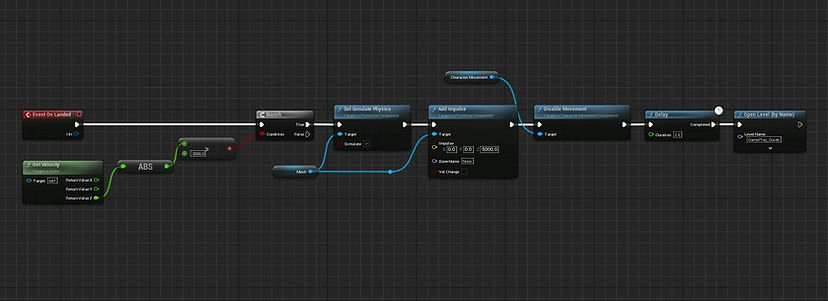
With my level theme being a space ship that has crashed onto an asteroid, and adding in the Jetpack mechanic, players would easily be able to escape my level and jetpack off into the abyss of space. I struggled to figure out a way to stop this from happening, other than simply placing blocking volumes everywhere. I used a limited fuel supply for the jet pack as a way to limit the time the jetpack could be used; however, this still wouldn’t stop players from just using the jetpack to go as high as they could and fall with no damage. Ok, so then I needed to add fall damage to the player that wants to fall from extreme heights, but what about if the player only falls from a lower height by accident? I was able to add the fall damage in a way that the player would be killed if they fell from a great height, but if the fall was not too high, they would be fine. I also added in a complete level restart when a player dies, so that if they do something they are not supposed to do (i.e., fly really high and drop to the ground) they will be forced to play the level from the start.
Source Control
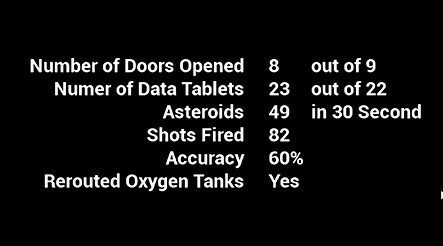
When it comes to tracking data, it is pretty simple. However, if the coding is placed in the wrong blueprint, then the data will not be tracked. This concept seems pretty straight forward. However, straight forward doesn’t account for tired coding. I somehow managed to duplicate a bit of code and hide it, so that when the project looked for the real code, and found it, it still didn’t work right due to the hidden code conflicting with the good code. Clear as mud, right? A lot of time was spent searching for the hidden code. Once it was found, and violently deleted, the rest of the code worked perfectly fine. All data points were able to be tracked once again! (No code was harmed in the events of this story, well…except for the snippet that was deleted. It was most definitely deleted.)

Source Control
A space ship, on an asteroid, in space wouldn’t really sell if the sky was blue and full of fluffy clouds. I wanted the sky dome to depict a space scene. I attempted to make this happen with what was built into unreal engine, but was not able to get the desired results. I then attempted to make my own, but it only ended up with a line where the cube map came together. This was worse that the blue sky and clouds. Eventually I was able to find a proper sky dome, but not before wasting 3 hours trying to figure it out.
Conclusion
To be honest this project started as one of those that I felt forced to do, and therefore, I just wasn’t into it, but I had a timeline to keep. However, by the end of the project, I grew to really like the direction the project was taking. Now I am very proud of what I was able to produce.
References
Uisco. (2022, October 29). How to make animations for the Unreal engine 5 mannequin. YouTube. Retrieved February 15, 2023, from https://youtu.be/tnZv7KQPai0
Asplund, M. (2021, June 9). PIN locked door - unreal engine tutorial. YouTube. Retrieved February 17, 2023, from https://youtu.be/_4d6v3ZJD4M