


Volcano Adventure: Post Mortem
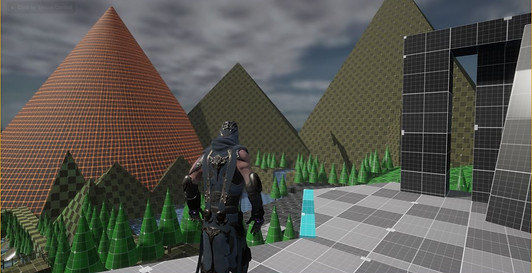
Volcano Adventure is a project that taught me how to create a game level from beginning to end. I started with a basic requirement of a 3-part level, with each area no bigger than 30x30, with an area of refuge in between the areas of prospect throughout the level. I began designing the level by using blockmesh to design the areas where the player could go. After that, I began to replace the blockmesh with actual final assests until it all came together into the final project.
What Went Right?
Maintain Interest Level
Toward the beginning of this project I learned that a player will get bored if they go more than 10 seconds without doing something. They also will get bored with the level if they are just repeating the same action over and over. With this information in mind, I was able to eliminate the need for long periods of just running from one obstacle to the next by designing interesting obstacles and interactions for the player. I was also able to maintain a high level of interest in my level by designing unique visuals and activities for the player to see and do as they traverse through my level.


The Bridge
From the early stages of my level, I knew that I wanted to have a rope bridge, and that I wanted it to be broken and falling apart. When I was blocking out my level, it was actually one of the first things that I designed, and it took me a few hours to get just right. I was very proud of my little bridge made of basic geometric shapes. Then came time to replace all those basic shapes with actual game assets. The bridge was one of those things that I knew had to be perfect, even though the player wasn’t going to dwell on the bridge and admire the craftsmanship, but if it was a believable representation of a rope bridge, then players would definitely critique the poor design. By the end of the project, the bridge was the last aspect of my level to be worked on. I spend days looking for the right texture, and coming up with nothing that, in my biased opinion, was good enough for this bridge. I was about to scrap the whole thing and just make it a long jump. Then I found it. I found the perfect asset that I could use that would allow me full customization of the bridge to recreate that image I had conjured from the basic blocks. So, what I learned from the bridge, is that even though some things in your level are not the focal point, that doesn’t mean that they don’t deserve the same time and attention to detail as the rest of the level.
The Ancient Bell
The ending to my level was always meant to be a signaling bell of some sort. I had originally envisioned a temple bell like in the Asian cultures. But once I placed that stylized structure into my level it just seemed out of place with the rest of the level. In the end I was able to change out the “bell” idea for giant brass sphere, and taking inspiration from the log that is used to ring the temple bells, I placed a metal pillar as the method to ring the “bell”. However, now I had this cool looking bell in the end of my level, but it was just there. It was pretty to look at, and nothing else. I wanted to create a way for the player to interact with it. I eventually came to the decision to make it be the signal it was always meant to be. Now, when a player walks up to the bell, they are greeted with a message to ring the bell. If they do, it sounds-off with a resounding gong, and lights their path for the next part of their journey!


Exit, Stage Left!
I sometimes have grand ideas that are impossible to pull off so I have to dial them back to reality to make them work. This is not one of those ideas. At the very end of my level, there is a large round disc blocking the passage through a cave and into the next level. When I was originally designing this gate, I knew that I wanted it to be animated in some way so that when the player got to it, it would force the player to stop and watch the spectacle play out before them. I just wasn’t sure how to go about this. When I settled on the gate being a disc, I just knew that the only way it could open, was to roll out of the way. This simple action caused me to have to do a lot of research on exactly how to make this work. After all my research, and some help from some teammates, I was finally able to make it work exactly the way I have envisioned!
The World Beyond
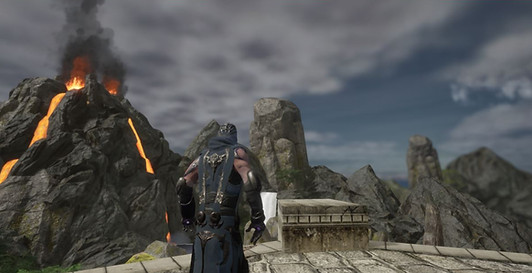
When I first started to design my level, I wasn’t thinking about anything outside of my little world. Then as I began to play test it, I started to notice areas where I could look past the world I created and into the void. This is not ideal for any game. I could have just made my level work in a cave, where the walls of the cave would act as a natural barrier to prevent the player from seeing out to the world beyond, but that is the easy way out. It would also mean that I would have to change my whole concept. I wasn’t willing to do either. So, I needed to design a world, or portion of it, that if seen from the right angle, would look believable, and keep the player immersed in the world I created. Since my level starts with a giant volcanic eruption, I decided to go with a more mountainous theme. I made a nice lake at the base of the volcano, and built up the mountains around it. Now, no matter where the player looks from, they know they are in the mountains, and if they stay, they will be swallowed up by the volcanic eruption!
What Went Wrong?
Sound Design

I found that as I would play through my level, that there was absolutely no sound coming from the world around me. So I began the task of adding in little sounds here and there. A crackling from the campfire, a trickling stream as it flows through the rocks, the echoes and hollowness that comes from being in a cave, the wind blowing once the player climbs up too high, and the rumble of the volcano. These where the sounds that I used to fully immerse the player into my world. They just didn’t all work. I had them placed in the right spots. I even thought that my settings were right, but in the end, some of the sounds just won’t play. This tells me that I have a lot to learn about sound design.
Textures
I managed to figure out how to get the textures to fit onto the basic blocks and look good. Others, however, looked so bad, that I ended up just deleting the blocks and going a completely different direction in those areas. This means that I need to learn to make my own textures, or materials, and learn how to better manipulate them once I import them into my project.


Lighting
Lighting is very important, especially in areas like a cave. I have a few areas of lighting that I am very proud of. However, there are also a few areas that I wish I knew more about how the lighting works in Unreal Engine so that I can adjust it properly.
Source Control
This is more of an area that I just want to better understand. I get the concept, and I was able to navigate through it for this project, but I still feel as though I don’t fully understand it. There are things that happened, that I don’t know why, or how to get them to stop happening. More experience, or even, more research, could really help in this area.

Conclusion
When this project was finished, I definitely breathed a sigh of relief. However, I still know that there are areas of improvement that I could work on. I also think that is always going to be the case. This project certainly taught me a lot about level design, and also taught me that I still have a lot to learn. I am definitely grateful for the experience, and look forward to learning whatever I can to improve my skills.